
Meshtastic MQTT: Talk Globally Beyond LoRa Range
Published by Vivian van Zyl in Meshtastic the 01/07/2026 at 01:56 pm

I have been playing with Meshtastic MQTT and wanted to share what I learned about extending LoRa mesh reach using the Internet. Meshtastic MQTT lets nodes communicate even when they are out of radio range by publishing and subscribing to topics on an MQTT server. That does introduce reliance on the Internet, but it also opens the mesh to anyone anywhere in the world. Below I explain the concepts, show practical configuration options (proxy vs gateway), and share tips from real tests.
Table of Contents
- How Meshtastic MQTT changes node communication
- MQTT topics and why they matter
- Enable MQTT on a device (proxy example)
- Enable uplink and downlink on channels
- Set up a Wi-Fi gateway (M5Stack C6L example)
- Important limitation: long-range public channel
- Real-world test: mobile proxy to home gateway
- Store and forward with MQTT
- Troubleshooting and best practices
- FAQ
- Final notes
How Meshtastic MQTT changes node communication
Meshtastic MQTT gives you two communication paths: the native LoRa mesh and an Internet-backed bridge. Use the LoRa mesh for local, radio-based messages. Use Meshtastic MQTT when you need to reach nodes that are out of radio range or when you want to connect remote users.
There are two common ways to enable MQTT for a node:
- Proxy mode: The node uses your phone as an Internet proxy. This is handy for nodes without Wi-Fi. Enable the proxy in the node's MQTT settings and the phone's connection relays traffic to the MQTT broker.
- Wi-Fi gateway: A node with Wi-Fi (for example an M5Stack C6L) connects directly to your local network and acts as an MQTT gateway. It uplinks and downlinks messages between the local LoRa mesh and the MQTT broker.
MQTT topics and why they matter
Meshtastic MQTT uses topics to control which nodes see which messages. The default root topic might be something like meshtastic or meshtastic/US. Narrowing the topic to a region or city (for example meshtastic/US/Florida/StPete) reduces noise and makes discovery more relevant.
Channels behave the same as over radio: messages to private channels remain encrypted with your key whether they arrive via LoRa or MQTT. That means private conversations remain private even when routed through the Internet.
Enable MQTT on a device (proxy example)
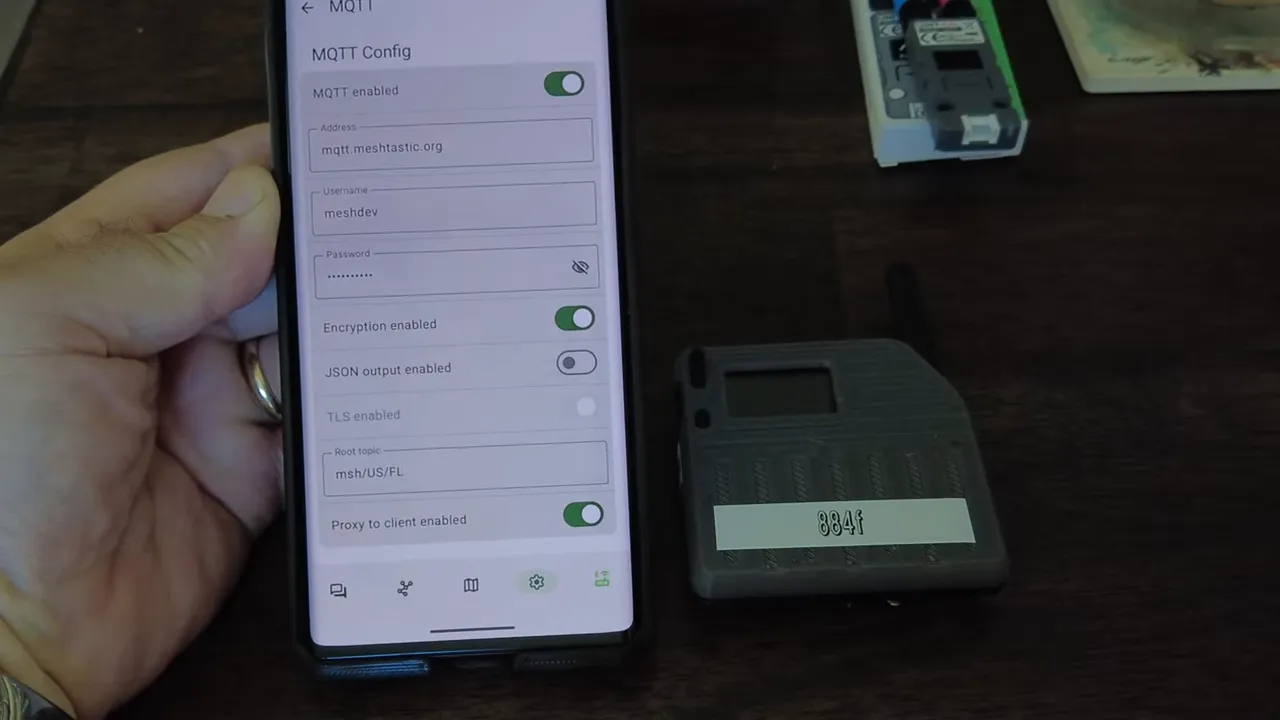
On a node without Wi-Fi (for example a UT114), open MQTT settings, set the MQTT server (you can use the public Meshtastic broker), enter the username and password if required, and set the root topic. If you want to use your phone as a proxy, enable the proxy checkbox before saving and push the settings to the node. The node will reboot and then appear as an MQTT-discovered device in the app.
Enable uplink and downlink on channels
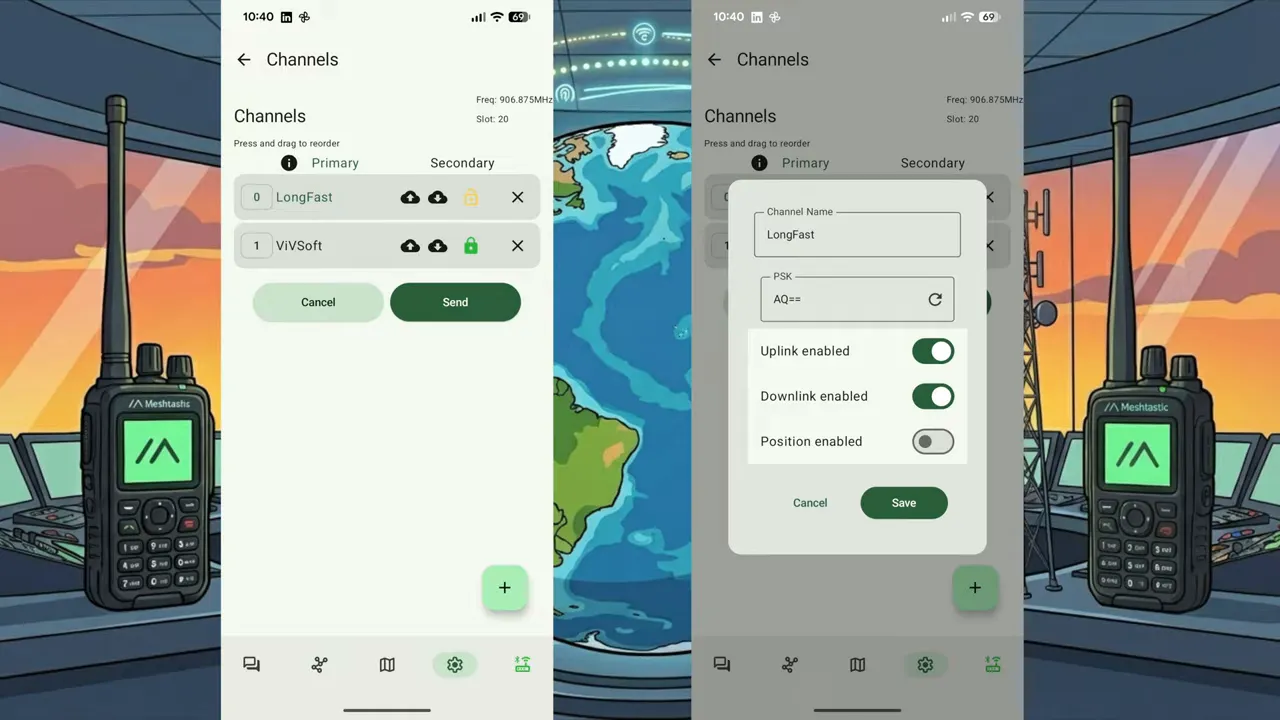
Don't forget to toggle uplink and downlink for the channels you want to bridge over MQTT. These controls tell the node to forward messages up to the broker and accept downlinks from the broker. After changing channel settings you may need to reboot the node.
Set up a Wi-Fi gateway (M5Stack C6L example)
A Wi-Fi-enabled node makes an excellent gateway. I like the M5Stack C6L because it includes separate antennas for Wi-Fi and LoRa. To convert it into a gateway:
- Connect the node to your Wi-Fi by entering SSID and password in the network settings and rebooting. The device will show an IP address when connected.
- In MQTT settings, choose your root topic and enable MQTT. Do not enable proxy since the node has its own Wi-Fi connection.
- Set your default (channel zero) to the private channel you want the gateway to serve so it can uplink and downlink that channel for the entire local mesh.
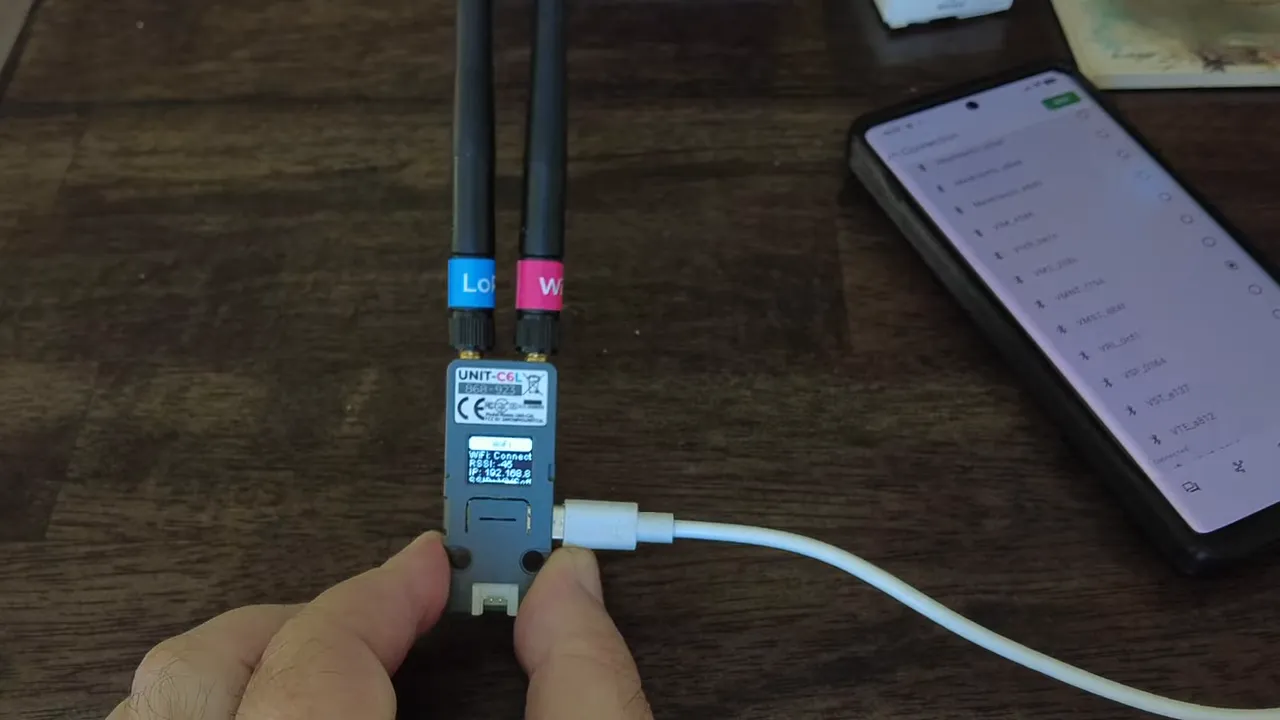
Once configured, the gateway will automatically uplink messages found on the local LoRa network to the MQTT broker and downlink broker messages back into the local LoRa mesh. This saves you from configuring every node with Wi-Fi or proxy settings.
Important limitation: long-range public channel
A key restriction to be aware of is that the default firmware will not act as an MQTT gateway for the public longfast channel. Gateways can handle private channels, but attempting to enable longfast as an MQTT-enabled default channel will throw an error. Plan your channels accordingly.
Real-world test: mobile proxy to home gateway
I did a simple test: I sat at McDonald's with my mobile node set to proxy through my phone and sent a message to a node at home. The home node received it via MQTT, shown as a cloud icon in the app and with SNR and RSSI values of zero because it did not arrive over radio. When I drove back within radio range and sent another message, the app showed it as a local LoRa message with normal SNR and RSSI.
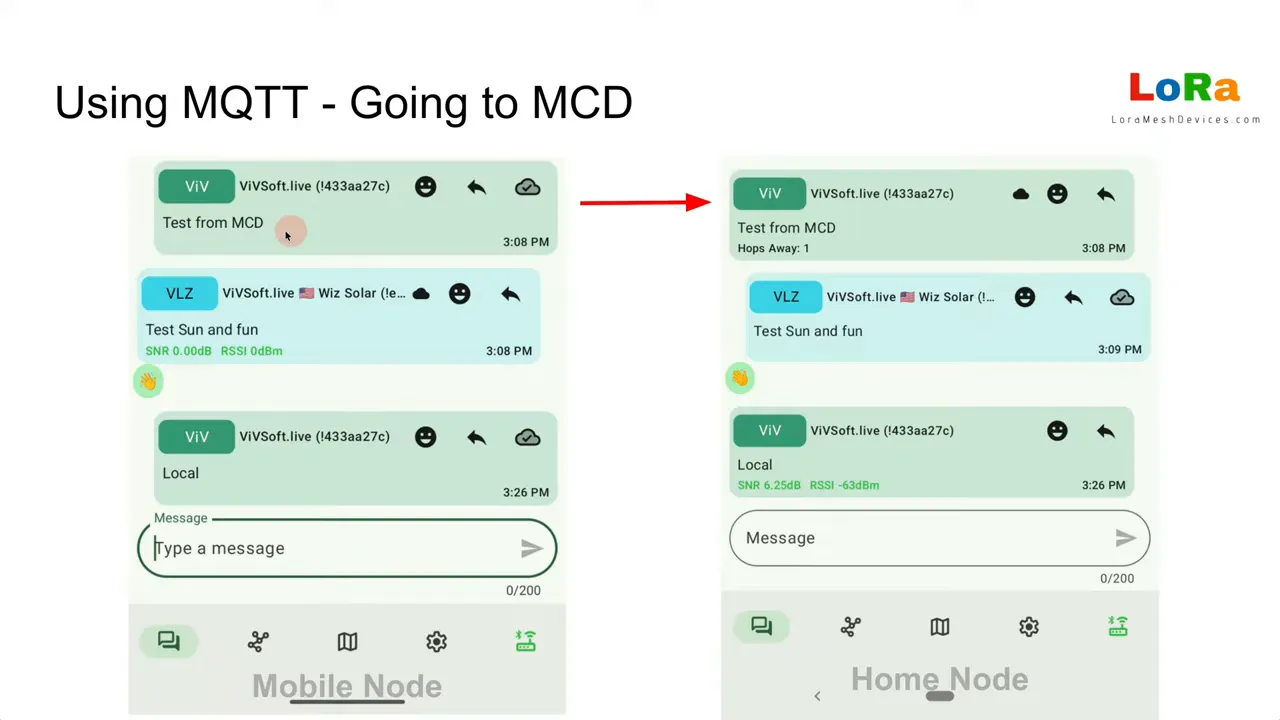
That demonstrates how Meshtastic MQTT lets you be anywhere in the world and still communicate with your local LoRa network, so long as a gateway or proxy path to the broker exists.
Store and forward with MQTT
If you run a store-and-forward server, it can also operate over MQTT. You can query the server for stored messages and have them forwarded to you even if your node was offline when the original message arrived. That capability is useful for intermittent connectivity scenarios.
Troubleshooting and best practices
- Start with clear topics — use geographic topic segmentation to reduce irrelevant traffic.
- Enable uplink and downlink intentionally — only toggle these on channels you want bridged.
- Use a gateway where possible — it simplifies configuration for many nodes and centralizes the broker connection.
- Remember channel privacy — private channels remain encrypted across MQTT, so your private traffic stays private.
- Watch longfast limits — default firmware prevents longfast from being used as an MQTT gateway.
FAQ
What is Meshtastic MQTT and why should I use it?
Meshtastic MQTT is the use of the MQTT protocol to route Meshtastic mesh messages over the Internet. Use it when you need nodes to communicate beyond radio range or want to connect remote users to a local mesh.
Can every node be an MQTT gateway?
Only nodes with Wi-Fi or a proxy-capable phone connection can talk directly to an MQTT broker. A Wi-Fi node can be configured as a gateway to service the entire local mesh for private channels.
Do private channels stay secure over MQTT?
Yes. Private channels are encrypted with your mesh key, so messages remain private whether they traverse LoRa or MQTT.
Can I enable the public longfast channel over MQTT?
Not on default firmware. Gateways cannot uplink/downlink the public longfast channel; only private channels are supported through a gateway.
Should I use proxy mode or a dedicated gateway?
If you only need occasional remote access for a single mobile node, proxy mode through a phone is quick. For multi-node networks, a Wi-Fi gateway is more robust and avoids configuring every node individually.
Final notes
Meshtastic MQTT is a straightforward way to expand the reach of your mesh without changing the underlying messaging model. Whether you use proxy mode on mobile devices or run a dedicated Wi-Fi gateway like the M5Stack C6L, Meshtastic MQTT gives you flexibility to connect locally and globally while keeping private channels secure.
If you are setting up a gateway, start simple: pick a clear topic, enable MQTT and the correct channel uplink/downlink, and verify that messages show as cloud-delivered when they come over the Internet and as local when they pass over LoRa. Happy meshing.