
Meshcore on ESP32: Build a Fast ESP-NOW Private Network and Bridge It to LoRa
Published by Vivian van Zyl in Meshcore the 07/20/2026 at 04:22 pm

Meshcore does not have to begin with dedicated LoRa hardware. Standard ESP32 and ESP32-S3 boards already include a 2.4 GHz radio, and with ESP-NOW they can form a fast, private, router-free messaging network using the hardware already on your desk.
The interesting part is not simply getting two ESP32 boards to exchange packets. The real win is combining a low-cost local ESP-NOW network with a long-range LoRa mesh through a bridge. That gives you speedy communication around the house, workshop, or property, while still allowing those local nodes to reach the wider LoRa network.
Table of Contents
- Why Meshcore Can Run on an Ordinary ESP32
- What ESP-NOW Brings to the Network
- Hardware Needed for a Small Meshcore ESP-NOW Network
- Set Up the ESP32 Nodes
- Test the Local ESP-NOW Meshcore Network
- Bridge the ESP-NOW Network to a LoRa Mesh
- Verify Discovery Across the Bridge
- Test Messages in Both Directions
- Where This Hybrid Meshcore Design Makes Sense
- Further Meshcore Bridge Resources
- FAQ
Why Meshcore Can Run on an Ordinary ESP32
A typical long-range mesh node combines an ESP32 processor with a LoRa transceiver such as an SX1262. A Heltec V3 is a good example because it includes the ESP32, Wi-Fi and Bluetooth connectivity, and an SX1262 LoRa radio on one board.
But many ordinary ESP32 boards have no LoRa radio at all. They may only have Wi-Fi and Bluetooth, while some ESP32-S3 boards also add useful extras such as a camera or microSD card slot. Normally, that would rule them out for a LoRa mesh.
The useful bit here is that Meshcore keeps radio communication separate from the rest of the messaging logic. That means the radio transport can be swapped out. Instead of using LoRa for the local link, we can use ESP-NOW, which is already built into the ESP32.
This makes inexpensive ESP32 boards useful as local Meshcore nodes without adding a separate LoRa module to every device.
What ESP-NOW Brings to the Network
ESP-NOW is a peer-to-peer data-link protocol that runs over the ESP32's 2.4 GHz radio. It does not work like normal Wi-Fi networking. There is no access point, no internet connection, and no router sitting in the middle.
Two ESP32 devices can communicate directly with one another. That makes it a great fit for a small private Meshcore network.
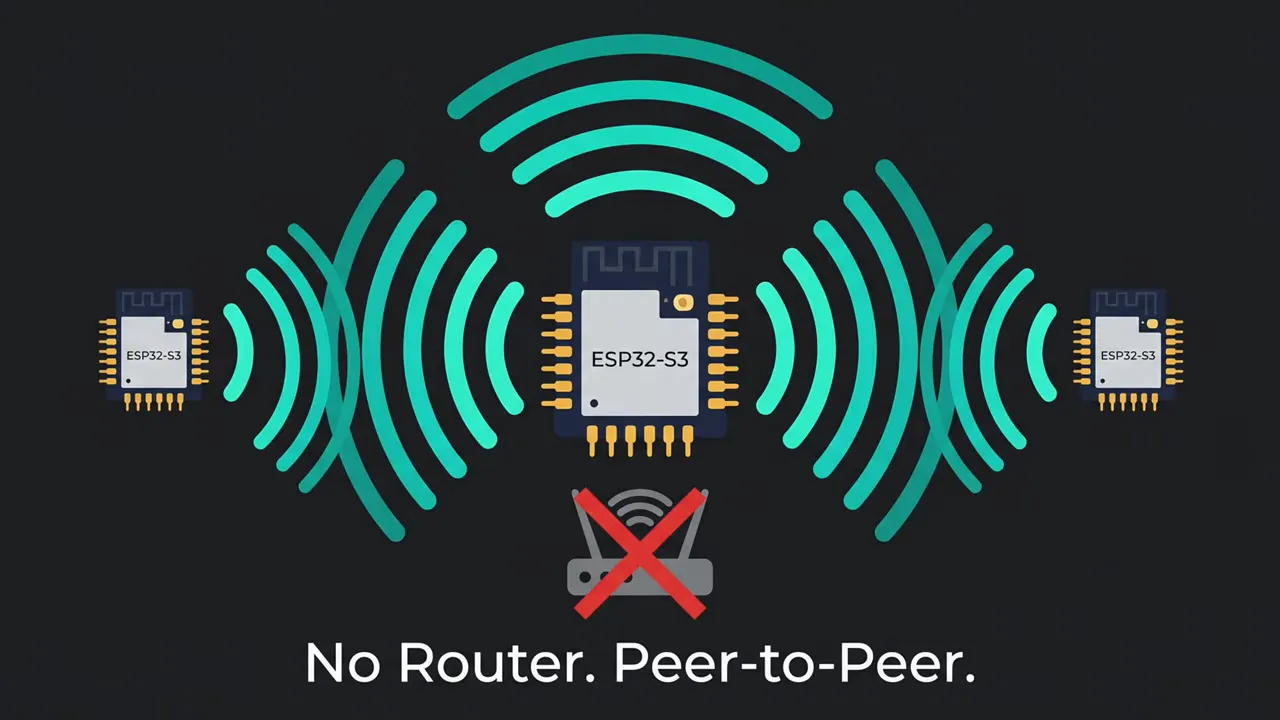
ESP-NOW versus LoRa
ESP-NOW is much faster than LoRa, but speed comes with a major range tradeoff. A typical outdoor ESP-NOW link may reach roughly 600 to 1,200 feet. With an external antenna, it may reach as far as about 2,000 feet in favorable conditions.
That is nowhere near LoRa territory, where a mesh can cover miles through well-positioned nodes and repeaters. Still, ESP-NOW is ideal for local communication where fast delivery matters more than extreme range.
- ESP-NOW: Fast, short-range, peer-to-peer communication on 2.4 GHz.
- LoRa: Slower, long-range communication designed for wide-area mesh coverage.
- The hybrid approach: ESP-NOW for a local Meshcore domain, plus a bridge to LoRa when you need the larger network.
Hardware Needed for a Small Meshcore ESP-NOW Network
The basic setup is refreshingly simple. For the local network, you only need two or more ESP32-compatible boards and a phone for each node you want to configure.
- Two standard ESP32 or ESP32-S3 boards
- USB cables for power and flashing
- Phones running the compatible mesh messaging app
- A LoRa-capable bridge device, such as a Heltec V3, if you want access to a wider LoRa mesh
Even a small collection of inexpensive ESP32 boards can become a useful private messaging network. If you need boards to experiment with, the ESP32 microcontroller option and an ESP32 camera board are examples of the sort of hardware that can be repurposed for this kind of project.
Set Up the ESP32 Nodes
Flash the Meshcore-compatible ESP-NOW firmware to each ESP32, then power up the first board. The phone app should show it as a newly available device when you select the connection option.
On a fresh device, the default pairing PIN is:
123456
Once connected, continue through the initial setup and give the node a clear name. In this example, the two boards were named ESP1 and ESP2.
Do not configure LoRa radio settings on these ordinary ESP32 boards, because they have no LoRa transceiver. Their local radio transport is ESP-NOW.
Repeat the Process for the Second Node
Power the second ESP32, connect to it from the second phone, enter the default pairing PIN, and assign a separate name. At this stage, both devices are configured but have no discovered contacts yet.
That is expected. Device discovery begins as the nodes advertise themselves across the local ESP-NOW network.
Test the Local ESP-NOW Meshcore Network
Start with a zero-hop advertisement from one ESP32 node. The other node should receive it through ESP-NOW over the 2.4 GHz local link. Repeat the advertisement from the other side so both nodes discover one another.
Once discovery is complete, the private network behaves much like a normal mesh messaging environment. You can use private chats, public channels, node advertisements, and contacts.
Private Messaging
Send a short private message from ESP1 to ESP2. The message should arrive very quickly because it is traveling over the local 2.4 GHz ESP-NOW connection. Reply from the second node to confirm that traffic works in both directions.
Public Channel Messaging
The same applies to a public channel. A message sent from ESP2 appears on ESP1, and a response from ESP1 arrives back at ESP2. At that point, you have a fully working private Meshcore-style network using only standard ESP32 hardware.
For a home lab, workshop, or local installation, this is a very neat way to put spare microcontrollers to work.
Bridge the ESP-NOW Network to a LoRa Mesh
The bridge is where this setup gets really interesting. A Heltec V3 can sit between the two network domains because it contains all the required radios:
- An ESP32 processor
- Wi-Fi and ESP-NOW capability
- An SX1262 LoRa transceiver
The bridge firmware forwards packets between the local ESP-NOW network and the LoRa network. Local ESP32 devices can therefore communicate with real LoRa nodes, repeaters, and contacts beyond the short-range 2.4 GHz domain.
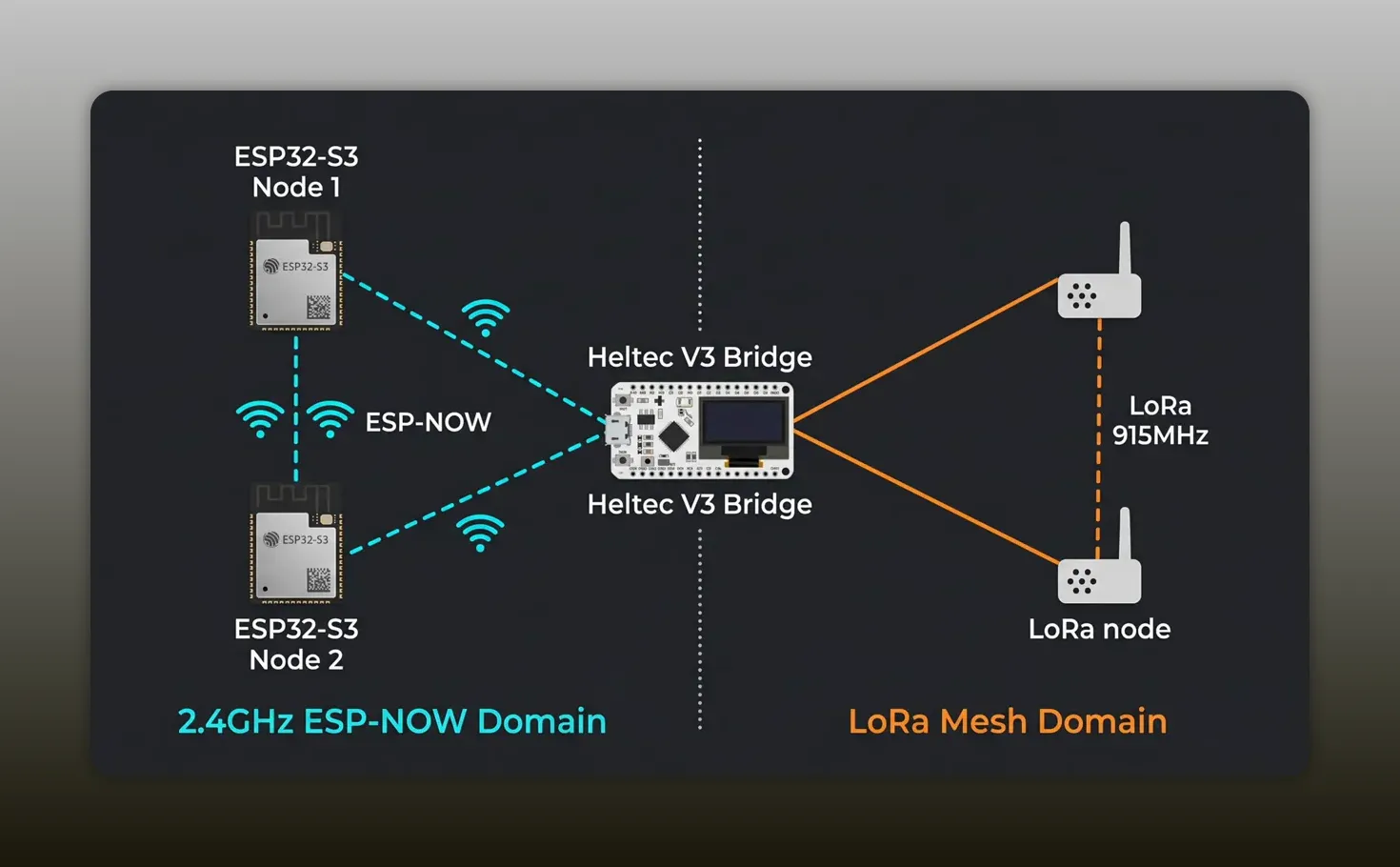
How the Bridge Works
In this implementation, the bridge is a straightforward packet forwarder. It receives traffic from one radio network and forwards it to the other. It does not perform deeper packet interpretation or advanced handling.
A more complete implementation can understand the packets and apply more sophisticated logic, but a blind forwarder is enough to prove the architecture and create useful connectivity between the two domains.
The bridge firmware needs to use the appropriate LoRa frequency for the mesh it will join. In this setup, the operating frequency was hardcoded into the firmware.
Verify Discovery Across the Bridge
Once the Heltec V3 bridge is powered up, the ESP-NOW nodes should discover it as a contact. More importantly, those local nodes can begin to discover devices that exist only on the LoRa side of the network.
For example, a LoRa repeater can advertise itself to the Heltec bridge, which then forwards that information to the ESP-NOW node. The local ESP32 now has visibility into nodes beyond the house or local property.
That is the point where the low-cost local Meshcore network becomes part of something much larger.
Test Messages in Both Directions
Discovery is good, but bidirectional messaging is the real test.
From ESP-NOW to LoRa
Send a flood route advertisement from an ESP-NOW node. After switching to a normal LoRa device on the wider mesh, the ESP32 node should appear in its contact list. This proves that the advertisement crossed from ESP-NOW, through the bridge, and onto LoRa.
Next, send a private message from the ESP-NOW node to the LoRa contact. When the LoRa device receives the message, the local-to-long-range path is working.
From LoRa Back to ESP-NOW
Reply from the LoRa device, then reconnect to the ESP-NOW node. The response should arrive there as well. That confirms two-way communication:
- ESP-NOW node to Heltec V3 bridge
- Heltec V3 bridge to LoRa mesh
- LoRa mesh back through the bridge
- Bridge back to the ESP-NOW node
You now have a local network built from very inexpensive ESP32 boards that can talk through a bridge to a LoRa mesh spanning far beyond local ESP-NOW range.
Where This Hybrid Meshcore Design Makes Sense
This arrangement is not a replacement for LoRa everywhere. It is a practical way to use the right radio for the right job.
- At home: Place inexpensive ESP32 nodes around the house for fast local messaging.
- In a workshop: Use ESP-NOW devices for local tools, sensors, or communication points, then bridge outward through one LoRa node.
- For experimentation: Build and test Meshcore concepts without putting dedicated LoRa hardware in every node.
- For expansion: Add a bridge only where the local ESP-NOW network needs access to the wider long-range mesh.
The architecture is flexible. The local side stays simple and affordable, while the bridge provides access to the long-range network when needed.
Further Meshcore Bridge Resources
For the firmware process, technical notes, and bridge details, refer to the Meshcore LoRa-to-ESP-NOW bridge guide. If you are looking for a dedicated long-range device, the Heltec T096 development board is another option for LoRa-based projects.
FAQ
Can Meshcore run on an ESP32 without a LoRa radio?
Yes. An ordinary ESP32 can use its built-in 2.4 GHz radio with ESP-NOW for local peer-to-peer messaging. It will not have LoRa range on its own, but it can join a wider LoRa mesh through a compatible bridge.
Does ESP-NOW need Wi-Fi or a router?
No. ESP-NOW uses the ESP32 radio but does not require a Wi-Fi access point, internet connection, or router. Devices communicate directly with one another.
How far can an ESP-NOW Meshcore node reach?
A typical outdoor ESP-NOW link may cover around 600 to 1,200 feet. With an external antenna and favorable conditions, it may reach up to about 2,000 feet. Results depend heavily on obstacles, placement, and antennas.
Why use ESP-NOW when LoRa has much better range?
ESP-NOW is faster and already available on standard ESP32 boards. It is useful for inexpensive, short-range local messaging, while a LoRa bridge can provide access to the wider long-range mesh when required.
What hardware is needed to bridge ESP-NOW to LoRa?
You need a device that includes both an ESP32 radio for ESP-NOW and a LoRa transceiver. A Heltec V3 is suitable because it includes the ESP32 and an SX1262 LoRa radio.
Can messages travel both ways through the bridge?
Yes. The bridge forwards packets from ESP-NOW to LoRa and from LoRa back to ESP-NOW, allowing local ESP32 nodes and remote LoRa mesh nodes to exchange messages in both directions.